The POS built for
WooCommerce stores.
Turn your WooCommerce store into a complete point-of-sale system. Sell in-store using the products, prices and inventory you already manage online.
No credit card required.
Already using WooCommerce? You're almost ready to sell in-store.
Akantio connects your physical store to the WooCommerce store you already know. Your products, prices and inventory stay connected — no second catalog to maintain.
Connect
Connect your WooCommerce store using your store API keys.
Sync
Your products and inventory are pulled in and kept in sync.
Sell
Start selling from Akantio POS at the counter.
Running online and in-store sales shouldn't mean running two businesses.
Selling through WooCommerce and a physical store often means separate systems, duplicate product catalogs, and inventory that doesn't match.
Two catalogs
Maintaining products in multiple systems.
Inventory discrepancies
Online and physical stock don't always match.
Manual work
Time spent re-entering orders and inventory by hand.
Disconnected sales
Your online and physical sales live in different places.
Akantio connects them.
One catalog. One inventory. One system.
Akantio gives your physical store a POS that works with the WooCommerce store you already run.
Everything a WooCommerce store needs at the counter.
Six things that matter — nothing you don't need.
WooCommerce Integration
Keep your existing WooCommerce products, prices and stock connected to your physical store — no second catalog to maintain.
Fast Checkout
A counter-ready interface built for speed: scan, add, charge, done.
Real-Time Inventory
Every in-store sale updates your WooCommerce stock automatically. No manual recounts, no overselling online.
Multiple Carts
Hold and switch between multiple open carts — built for busy counters with more than one customer at a time.
Offline Mode
Keep selling even when the internet drops. Cash and manual sales queue locally and sync automatically once you're back online.
Integrated Payments
Accept cards directly at the counter with Stripe Terminal or Revolut Terminal, or take ad-hoc payments through an external terminal.
See Akantio in action.
From WooCommerce product to completed in-store sale in seconds.
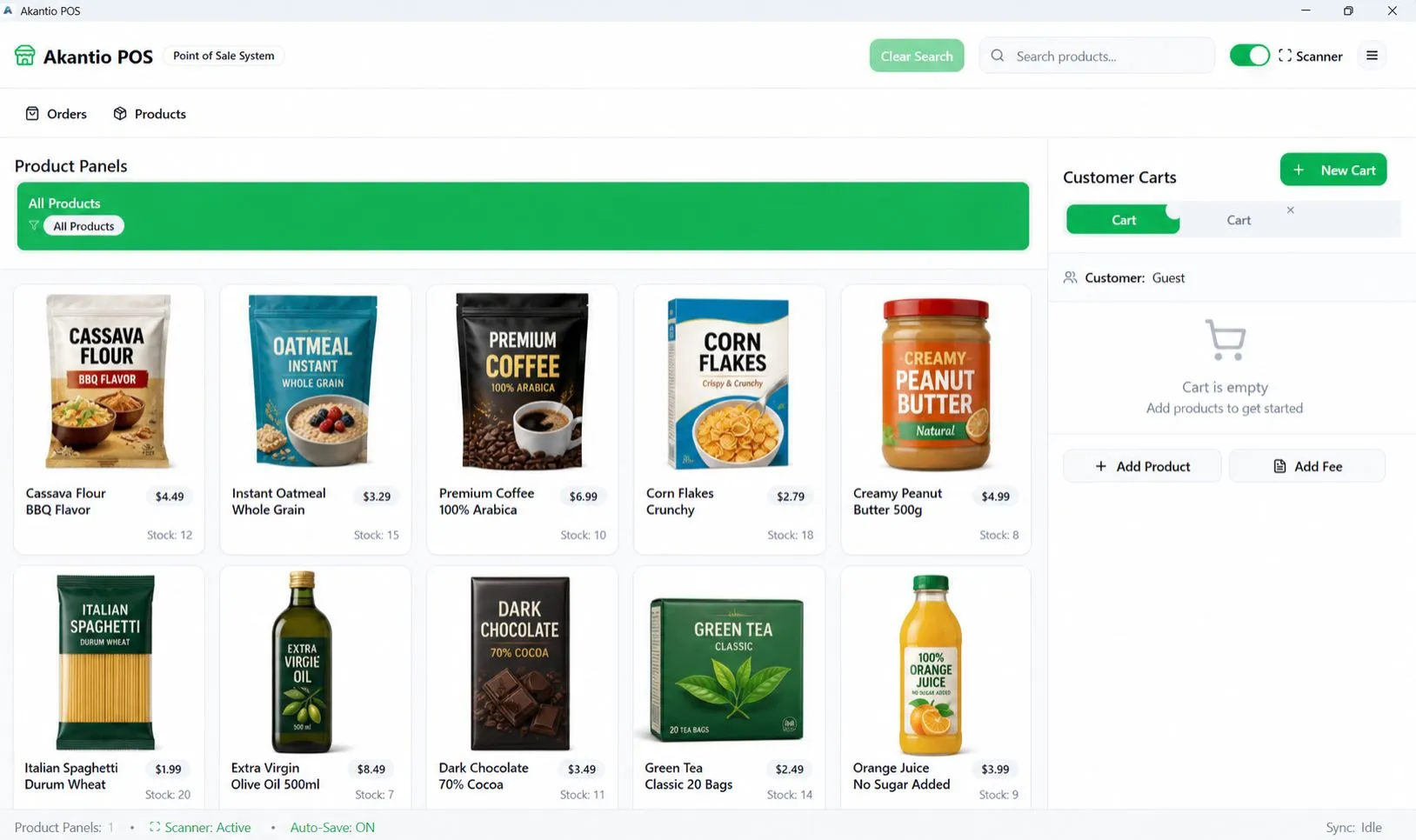
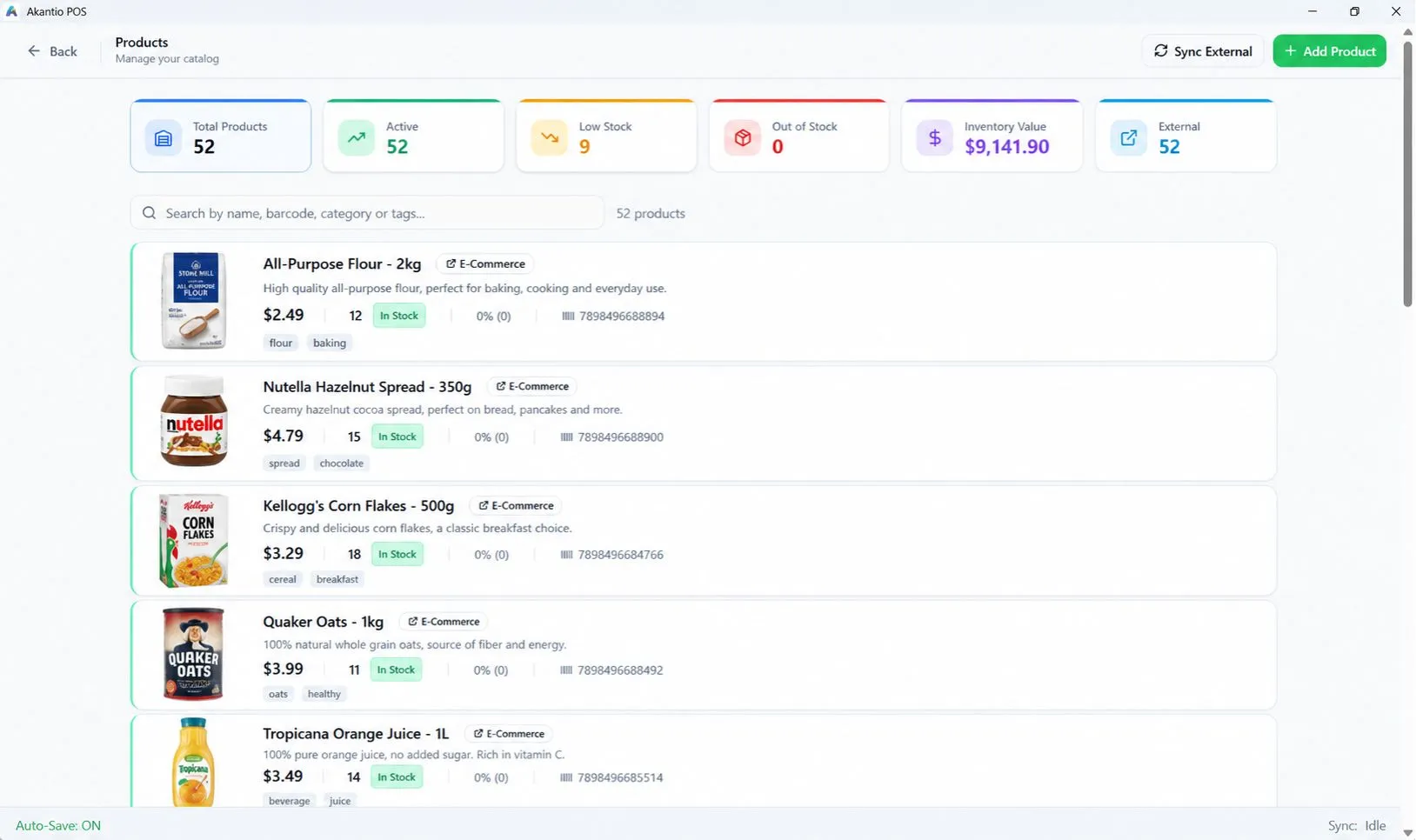
Point of Sale
The counter screen — built for speed, not clicks.
Built for businesses that sell online and in-store.
Retail Stores
Sell in-store while keeping the WooCommerce inventory you already manage online in sync.
Specialty Stores
Run a detailed product catalog — categories, variants, stock levels — across online and in-person sales.
Food & Grocery
Keep counter sales and your online shop pulling from the same stock numbers.
Small Businesses
Start free with the WooCommerce store you already run, and grow into Pro without switching systems.
Why use a POS built for WooCommerce?
Your WooCommerce store already manages your products and online orders. Why maintain another system for your physical store?
| Traditional POS | Akantio | |
|---|---|---|
| WooCommerce integration | Usually needs a separate integration | Built around WooCommerce from day one |
| Product catalog | Maintained separately | Your existing WooCommerce catalog |
| Inventory | Tracked separately in-store | Synced to WooCommerce on every sale |
| Setup | New products, new price lists | Connect your store and start selling |
Built for real WooCommerce businesses.
We ship updates and roadmap items publicly — see what's shipped and what's next on the Roadmap.
Frequently asked questions.
Is Akantio compatible with WooCommerce?
Yes. Akantio is built specifically to connect a physical store to your existing WooCommerce store.
Do I need to create my products again?
No. Akantio imports the product catalog you already manage in WooCommerce.
Does Akantio synchronize inventory?
Yes. When you sell something in-store, the stock level updates in WooCommerce so your online store stays accurate.
Can I use Akantio without WooCommerce?
Akantio is built around WooCommerce — that's where the catalog and inventory sync come from. If you don't run WooCommerce, most of what makes Akantio useful won't apply yet.
Ready to connect your physical store to WooCommerce?
Start selling in-store with the products and inventory you already have.